hf(原 huggingface-cli)作为 Hugging Face Hub 官方原生命令行工具,一站式搞定模型 / 数据集拉取上传、仓库运维、缓存清理、镜像加速、账号权限管理全流程,是 AI 工程、推理部署、离线模型本地化必备利器。
一、安装python环境
在安装 CLI 工具前,请确保系统已具备 Python 3 环境及相关包管理工具。
1
2
3
4
5
6
7
8
9
10
11
12
13
|
sudo apt install -y python3 python3-dev python3-venv
sudo apt install -y python3-pip
python3 --version
pip3 --version
sudo ln -s /usr/bin/python3 /usr/bin/python
sudo ln -s /usr/bin/pip3 /usr/bin/pip
|
二、安装方式选择
推荐使用 pipx 或 虚拟环境 两种方式安装 huggingface_hub 包,以获得干净隔离的运行环境。
1、通过pipx安装
pipx 专为 Python 命令行工具设计,会自动为每个工具创建独立虚拟环境,并将可执行文件链接到系统 PATH,避免依赖冲突。
pipx 可以通俗地理解为:专门为“安装和运行 Python 命令行工具”而生的应用商店。- 它在后台自动为每一个你要装的工具(比如
huggingface-cli、black、httpie)创建一个独立的虚拟环境(venv)。
- 然后,它只把那个环境里的可执行命令(
bin 目录),通过软链接(symlink)放到系统的 PATH 环境变量里。
1
2
3
4
5
6
7
8
9
10
11
12
13
14
15
16
17
18
19
20
21
22
23
24
25
26
27
28
|
apt install -y pipx
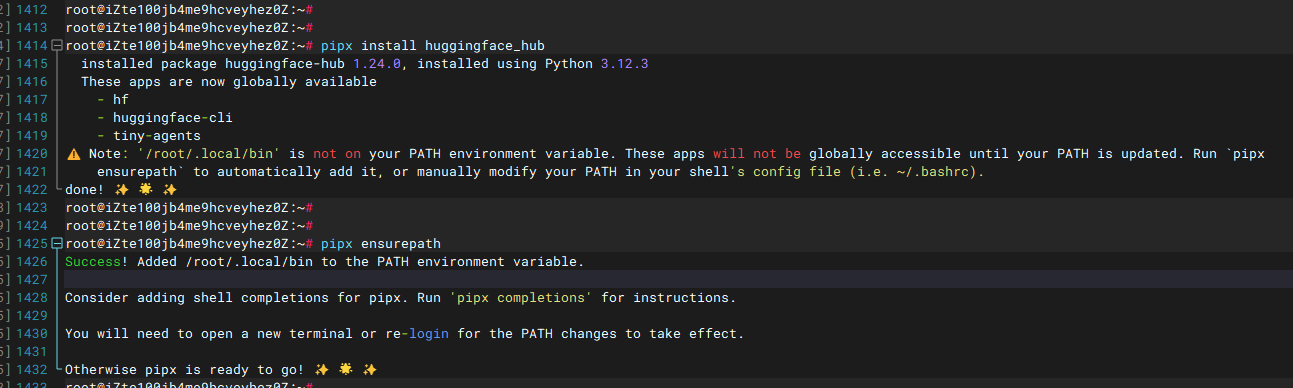
pipx install huggingface_hub
pipx ensurepath
source ~/.bashrc
hf version
pipx list
pipx upgrade huggingface_hub
pipx uninstall huggingface_hub
|
2、通过虚拟环境安装
1
2
3
4
5
6
7
8
9
10
11
12
13
14
15
|
python3 -m venv venv && source venv/bin/activate
pip install huggingface_hub -i https://pypi.tuna.tsinghua.edu.cn/simple
pip install -U huggingface_hub -i https://pypi.tuna.tsinghua.edu.cn/simple
pip install -U huggingface_hub -i https://pypi.tuna.tsinghua.edu.cn/simple --break-system-packages
hf version
|
三、基础配置
1、配置国内镜像加速
1
2
3
4
5
6
7
|
export HF_ENDPOINT=https://hf-mirror.com
echo "export HF_ENDPOINT=https://hf-mirror.com" >> ~/.bashrc
source ~/.bashrc
|
2、登录认证
公开模型无需登录,只有访问私有模型或执行上传、创建等写操作时才需要认证。
1
2
3
4
5
6
7
8
9
10
11
12
|
hf auth login
hf auth whoami
hf auth logout
hf auth switch
hf auth list
|
四、常用命令
基础命令
1
2
3
4
5
6
7
8
9
10
11
12
13
14
15
16
17
|
hf --help
hf --install-completion
hf --show-completion
hf version
hf env
hf update
|
1、下载模型/数据集
1
2
3
4
5
6
7
8
9
10
11
12
13
14
15
16
17
18
19
20
21
22
23
24
25
26
27
28
29
30
31
32
33
34
35
36
37
|
hf download \
Qwen/Qwen3-0.6B \
--local-dir /data/models/Qwen3-0.6B
hf download meta-llama/Llama-3.2-1B-Instruct
hf download --repo-type dataset username/dataset-name
hf download meta-llama/Llama-3.2-1B-Instruct --revision main
hf download bigscience/bloom --include "*.json"
hf download bigscience/bloom --exclude "*.bin"
hf download Qwen/Qwen3-Embedding-4B --local-dir /data/models/Qwen3-Embedding-4B
hf download meta-llama/Llama-3.2-1B-Instruct --force-download
hf download meta-llama/Llama-3.2-1B-Instruct --dry-run
hf download meta-llama/Llama-3.2-1B-Instruct --max-workers 4
|
2、上传文件
1
2
3
4
5
6
7
8
9
10
11
12
13
14
15
|
hf upload my-cool-model . .
hf upload my-cool-model ./model.safetensors
hf upload my-cool-model ./data/train.csv remote/data/
hf upload --repo-type dataset username/dataset-name ./data/ remote/data/
hf upload --repo-type space username/space-name ./app/ .
hf upload my-cool-model . . --private --revision v1.0
|
3、仓库管理
1
2
3
4
5
6
7
8
9
10
11
12
13
14
15
16
17
18
19
20
|
hf repo create my-new-model
hf repo create my-dataset --repo-type dataset --private
hf repo delete my-old-model
hf repo move old-namespace/my-model new-namespace/my-model
hf repo rename my-model new-name
hf repo branch create my-branch
hf repo branch delete my-branch
hf repo branch list
hf repo settings my-repo --visibility public
hf repo settings my-repo --gated
|
4、查看与管理缓存
1
2
3
4
5
6
7
8
9
10
11
|
hf cache ls
hf cache ls --revisions
hf cache verify gpt2
hf cache ls --cache-dir /custom/cache
|
5、模型 / 数据集 / Spaces 查询
1
2
3
4
5
6
7
8
9
10
11
12
13
14
15
16
17
18
19
|
hf models ls --search "Qwen3" --author Qwen --limit 10
hf models ls Qwen/Qwen-Image-2512 --path ./
hf models info Qwen/Qwen-Image-2512
hf datasets ls --search "code" --sort downloads
hf datasets ls HuggingFaceFW/fineweb --path data/
hf datasets info HuggingFaceFW/fineweb
hf spaces ls --author username
hf spaces info username/my-space
hf spaces logs username/my-space
|
6、文件复制与同步
1
2
3
4
5
6
7
8
9
10
11
12
13
14
15
16
17
18
19
20
|
hf cp hf://username/my-model/config.json ./config.json
hf cp ./config.json hf://username/my-model/config.json
hf cp hf://src/repo/file.txt hf://dst/repo/file.txt
hf cp -r hf://username/my-model/ ./my-model-backup/
hf sync ./local_dir/ s3://my-bucket/remote_dir/
hf sync ./local_dir/ hf://username/my-model/
hf sync ./data/ hf://username/dataset/data/ --exclude "*.tmp" --dry-run
|
7、其他命令大全
1
2
3
4
5
6
7
8
9
10
11
12
13
14
15
16
17
18
19
20
21
22
23
24
25
26
27
28
29
30
31
32
33
34
35
36
37
38
39
40
41
42
43
44
45
46
47
48
49
50
51
52
53
54
55
56
57
58
59
60
61
62
63
64
65
66
67
68
69
70
71
72
73
74
75
76
77
78
79
80
81
82
83
84
85
86
87
88
89
90
91
92
93
94
95
96
97
98
99
100
101
102
103
104
105
106
107
108
109
110
111
112
113
114
115
116
117
118
119
120
121
122
123
124
125
126
127
128
129
130
131
132
133
134
135
136
137
138
139
140
141
142
143
144
145
146
147
148
149
150
151
152
153
154
155
156
157
158
159
160
161
162
163
164
165
166
167
168
169
170
171
172
173
174
175
176
177
178
179
180
181
182
183
184
185
186
187
188
189
190
191
192
193
194
195
196
197
198
199
200
201
202
203
204
205
206
207
208
209
210
211
212
213
214
215
216
|
hf discussions list username/my-repo
hf discussions create username/my-repo --title "Bug report" --description "..."
hf discussions create username/my-repo --title "Fix bug" --type pr
hf discussions view username/my-repo 123
hf discussions comment username/my-repo 123 --message "LGTM"
hf discussions merge username/my-repo 123
hf discussions close username/my-repo 123
hf endpoints ls
hf endpoints create --name my-endpoint --model my-model --type gpu-small
hf endpoints info my-endpoint
hf endpoints update my-endpoint --instance-type gpu-large
hf endpoints delete my-endpoint
hf jobs ls
hf jobs run --script train.py --requirements requirements.txt
hf jobs info job-id
hf jobs cancel job-id
hf jobs logs job-id
hf sandbox create --name my-sandbox --cpu 2 --memory 8GB
hf sandbox ls
hf sandbox ssh my-sandbox
hf sandbox stop my-sandbox
hf sandbox delete my-sandbox
hf collections view username/my-collection
hf collections list username
hf collections create --title "My Collection" --description "..."
hf collections add username/my-collection --item hf://username/model
hf collections remove username/my-collection --item hf://username/model
hf papers ls
hf papers info paper-id
hf papers upload ./paper.pdf --title "My Paper" --authors "Me"
hf skills ls
hf skills create --name my-skill --description "..."
hf skills update my-skill --config config.yaml
hf skills delete my-skill
hf webhooks ls
hf webhooks create --url https://example.com/webhook --events push,pr
hf webhooks info webhook-id
hf webhooks update webhook-id --url https://new-url.com
hf webhooks delete webhook-id
hf buckets ls
hf buckets create my-bucket
hf buckets info my-bucket
hf buckets delete my-bucket
hf extensions ls
hf extensions install my-extension
hf extensions uninstall my-extension
hf extensions update my-extension
hf auth login
hf download meta-llama/Llama-3.2-1B-Instruct
hf repo create my-org/my-model --private
hf upload my-org/my-model ./model_files/ .
hf download --repo-type dataset username/dataset --local-dir ./dataset
hf cache ls --revisions
hf cp hf://microsoft/DialoGPT-medium/config.json .
hf sync ./data/ hf://username/my-dataset/data/ --exclude "*.log"
hf auth --help
hf download --help
hf upload --help
hf repo create --help
|